 Network Storage for s&box
Library overview
Install the library, configure credentials and call endpoints from game code.
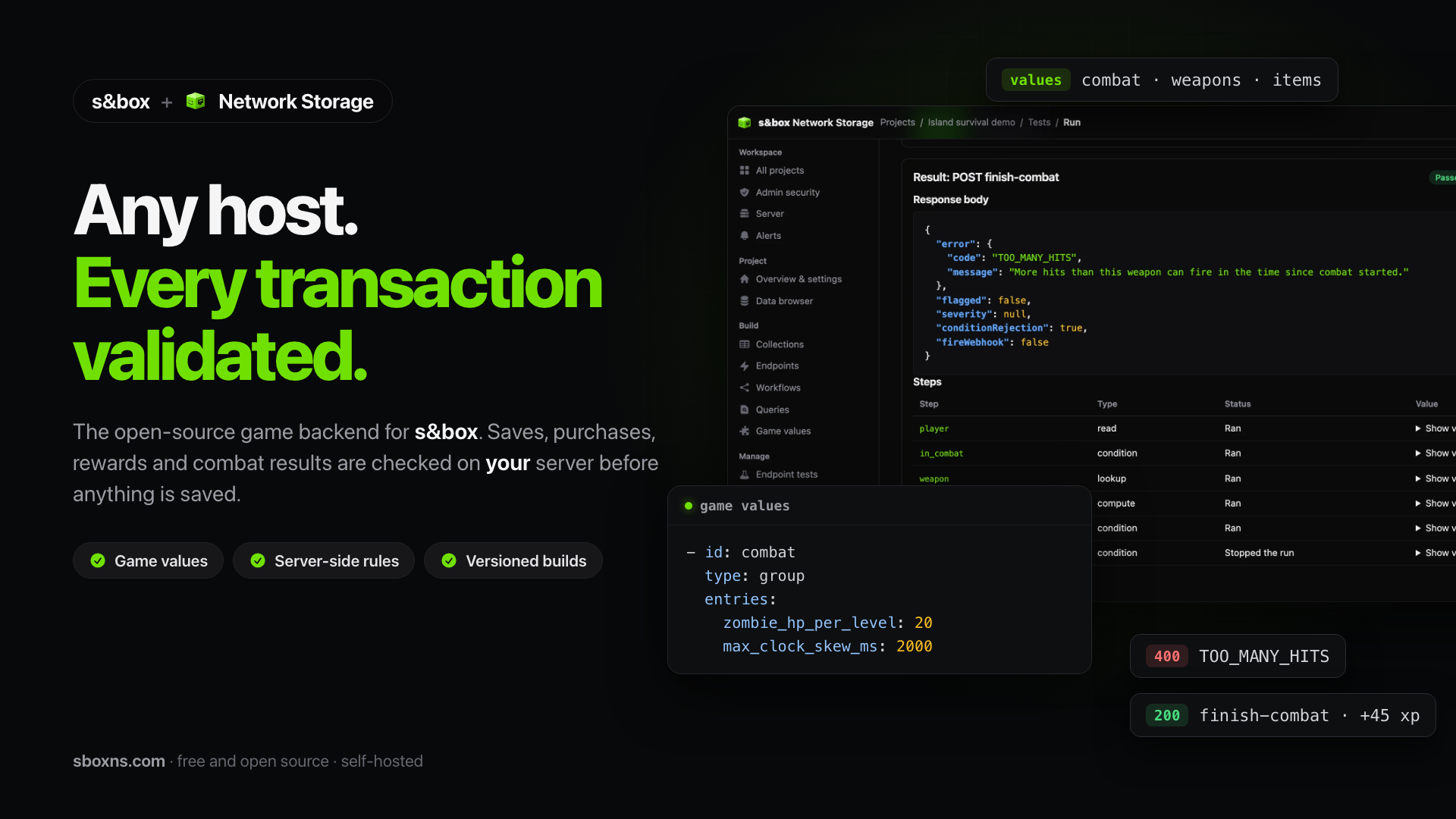
Client library and editor tools for an open-source s&box game backend.
Open-source, self-hosted game backend for s&box. Your server owns saves, rewards and the shared game values, and checks every claim a client makes. It works for player-hosted sessions and dedicated servers.
This repo is the client library + editor Sync Tool — install via the s&box editor at https://sbox.game/sboxcool/network-storage. The backend API is open-source and self-hostable: https://github.com/sbox-cool/sbox-network-storage-server — start at sboxns.com, the self-hosting landing site.
Useful Links
- Network Storage: https://sbox.cool/tools/network-storage
- Documentation & Tutorials: http://sbox.cool/wiki/network-storage-v3
- s&box editor Library: https://sbox.game/sboxcool/network-storage
- Search
Network Storage by sbox.coolwith author name:sboxcool
- Search
- Community Discord (sboxns.com and sbox.cool): https://sboxns.com/discord-invite
- sbox.cool and sboxcool.com are both operated the same group.
SboxCool.comis our LTS url, e.g.api.sboxcool.com.
Features
- Runtime Client — Call server endpoints, fetch game values, read/write documents from your game code
- Game values — One call loads every group and table; endpoints read the same numbers on the server, and each published build keeps its own
- Editor Sync Tool — Push and pull collections and endpoints between local YAML source files and your Network Storage server (the
baseUrlinprojectConfig.json) - Setup Wizard — Editor window for entering and validating your API credentials
- Diff Viewer — Side-by-side comparison of local vs remote data before syncing
- Network Logger — Ring buffer that captures all API traffic for in-game debug panels
- JSON Helpers — Extension methods for reading API response payloads
Installation
From s&box (recommended)
Install directly from the s&box asset browser:
https://sbox.game/sboxcool/network-storage
Or find it in the editor:
- Open the s&box editor
- Go to Editor > Library Manager
- Search for "Network Storage"
- Look for the one published by sboxcool — do not install from other authors
- Click Add to Project
The library appears in your project's Libraries/ folder automatically.
Manual (git clone)
Clone this repo into your project's Libraries/ directory:
cd "YourProject/Libraries"
git clone https://github.com/sbox-cool/sbox-network-storage "Network Storage by sboxcool"
Or add it as a git submodule:
git submodule add https://github.com/sbox-cool/sbox-network-storage "Libraries/Network Storage by sboxcool"The editor does not pick up a library folder added while it is running: restart the editor (or reopen the project) after cloning. Checked on s&box 26.10.13.
Updating
Use Library Manager to update; it replaces the library folder. For a manual install, git pull inside the library folder, or delete the old Libraries/<library folder> completely and install again. Do not copy new files over an old install: files moved between versions (for example JsonHelpers.cs, NetLog.cs, NetworkStorageClient.cs now live under Code/Core/) would exist twice and the project fails to compile with duplicate-type errors (CS0121).
Requirements
Library versions before 1.0.309133 do not start on s&box editor 26.10 or later (Constructor on type 'SyncToolWindow' not found). Update the library.
Using unreleased features (main)
The main branch can contain fixes and features that are merged but not yet published on sbox.game. The owner dashboard of the self-hosted server lists them, with how long they have waited and how far the published library lags the latest s&box engine release.
To try them now, replace the library folder with the main branch:
- Close the editor.
- Delete the existing library folder in
Libraries/, or keep a copy of it. - Download
https://github.com/sbox-cool/sbox-network-storage/archive/refs/heads/main.zip, extract it intoLibraries/, and rename the extractedsbox-network-storage-mainfolder tosboxcool.network-storage. Alternatively,git clonethe repository into that folder and check outmain. - Start the editor again.
To return to the released library, delete that folder and install it from sbox.game as described above.
Caveats:
- Unreleased code has passed the GitHub Actions compat gate, but not the native Windows editor run that a published release requires. Expect changes, and do not ship games built on it.
maincan need a newer server than the published library. SinceLibraryVersion1.2.0 the default API root is/api, which servers before 0.5.5 do not serve; setapiVersiontov3inprojectConfig.jsonfor those servers (see Setup).
Server compatibility status
The library reads x-ns-server-version and x-ns-library-status from server responses and capabilities from /v3/server-info, then exposes:
| Member | Meaning |
|---|---|
NetworkStorage.ServerVersion |
Last version the server reported, or null on servers without the header. |
NetworkStorage.LibraryStatus |
supported, outdated, deprecated, unsupported, blocked or unknown. |
NetworkStorage.OnLibraryStatusChanged |
Raised when the status changes (not on repeats). No player-facing UI is shown. |
NetworkStorage.HasCapability(name) |
true unless the server lists its capabilities and the name is missing. Servers without capability metadata (0.4.0) keep every feature. |
A 426 LIBRARY_UNSUPPORTED or LIBRARY_BLOCKED response is surfaced through TryGetLastEndpointError with the server's message, and logged once. In the editor, Setup and the Sync Tool show a dismissible banner for outdated/unknown (or a newer published package revision), a once-per-session dialog for deprecated, and refuse Push All for unsupported/blocked with update steps; Pull and Test Live keep working. Editor lookups that fail (offline, older server, no package) show nothing. Nothing here runs in play mode or published games.
Open questions recorded from the L2 spike: no documented editor API was found to open Library Manager or start the update from code, so the prompts link to the sbox.game page and tell the developer to replace the whole folder. Whether Library Manager's version dropdown allows selecting older revisions is not verified; the supported rollback path stays a tagged release folder replacement (above).
Library identity and release process
NetworkStorage.LibraryVersion is the library SemVer (1.2.0), not the
s&box package revision in .version or a game's published revision.
NetworkStorage.MinServerVersion is 0.4.0, the self-hosted baseline;
it is metadata, not a runtime rejection or a claim of editor certification.
The existing public PackageVersion property reports the same SemVer.
Runtime, Sync Tool and Python sync requests send x-ns-library-version.
Sync Tool and Python additionally send x-ns-client-type: editor and
x-ns-library-revision when the installed package's .version contains a
positive 64-bit revision (1.0.<revision>). A missing/unreadable/malformed
revision is omitted. The editor reads the standard
Libraries/sboxcool.network-storage/.version path; a differently named manual
checkout omits that optional header. Python reads its own library directory.
Restart the editor after replacing a library, because its package metadata is
cached for the session.
Runtime does not read the library checkout's .version: game filesystem
mounts expose assets, not a reliable library source-directory path. Its
availability in published bundles has not been verified, so runtime omits the
package-revision header rather than guessing or reporting the game's revision.
No credential, authentication, publish-target or game-revision behavior changes.
Servers without compatibility metadata continue to work; these headers are
self-reported diagnostics, not authentication.
Maintainer release sequence:
- Bump
LibraryVersioninCode/Core/NetworkStorageClient.cs; Python reads that constant, so there is no second SemVer to update. - Publish only a
maincommit whose Compat gate is green: the public API check, and this library running inside s&box against the latest server release, the oldest supported one (MinServerVersion) and servermain(docs/compat-gate.md). Green engine legs certify everyCode//Editor/change; no native editor run or label is needed for that. Ifmainmoved since its last run, run the gate on that commit by hand (Actions > Compat gate > Run workflow) before publishing. Before publishing, also record a native run of the exact version: one Windows PC with the Steam build of s&box runstools/sbox-cli-e2eagainst it and records apassrow in the server'scompat/library-matrix.json(see the server'sdocs/editor-test-plan.md). Follow compatibility certification. - Tag the tested source
vX.Y.Z, then publish on sbox.game from that commit. - Within about 30 minutes the revision sync tags the matching commit
r<revision>and creates its GitHub Release (see "Versions and sbox.game revisions"); add the tested server/engine/provider pairings with evidence links to its notes. From then on the server's Compat gate runs this revision against every server change and release, and this repo's nightly gate runs it against the latest server release, opening acompatissue if it breaks. - Submit the published-library entry and tested evidence to the server's
compat/library-matrix.json(server #59).
Before releasing 1.1.0, retain the last legacy source 0532c00
(package 1.0.309133) with a maintainer-created v1.0.309133 tag. No tag or
package publication is implied by this source change. For rollback, replace the
whole library folder with a supported tagged release, then republish the game.
Tracking: L1 #7
↔ server #58.
Native run for the library release that ships this (not a PR gate): interactive Play mode and Sync
Tool against the version-aware server and released 0.4.0. Record library source commit/SemVer,
assigned package revision, server commit/version, engine build, database and evidence URLs as a
pass row before that release. Green engine legs alone do not record this native run.
Versions and sbox.game revisions
LibraryVersion (SemVer) and the sbox.game package revision are separate.
sbox.game assigns each publish a global revision; no committed file predicts it,
and .version is only the Library Manager install marker.
.github/workflows/sbox-revisions.yml maps every published revision to the
commit whose shipped files match the revision's public manifest by size and CRC64
(line endings normalized), then creates a lightweight tag r<revision> and a
GitHub Release <LibraryVersion> · sbox.game r<revision>. Only the current
revision is marked latest. Existing tags are never moved. Revisions published from
a commit that is on a remote branch only are reported as such.
To check one revision locally:
node .github/scripts/sbox-revisions.mjs --revision <id>Publish only from a committed and pushed tree; the mapping can only find commits that exist on the remote.
Setup
1. Create a project on sboxcool.com
- Go to sboxcool.com and create a new project
- Note your Project ID from the dashboard
- Create API keys:
- Public key (
sbox_ns_prefix) — used by the game client at runtime - Secret key (
sbox_sk_prefix) — used by the editor sync tool only, never ships with your game
- Public key (
2. Configure in the s&box editor
- Open Editor > Network Storage > Setup
- Enter your Project ID, Public API Key, and Secret Key
- Click Save Configuration
- Click Test Connection to verify
Your credentials are saved to Editor/Network Storage/.env — this file is in the Editor/ directory which s&box excludes from publishing. Your secret key never ships with your game.
To use a self-hosted server instead of api.sboxcool.com, set baseUrl in Editor/Network Storage/config/public/projectConfig.json (or NetworkStorage.Configure( projectId, publicKey, "https://your-server" ) in game code). The Sync Tool window shows the active server (highlighted when it is not api.sboxcool.com) and the last request it sent.
New projects get the API root /api (https://your-server/api/...) from the Sync Tool template. Servers released before 0.5.5 do not serve /api: set apiVersion to v3 in projectConfig.json, or pass "v3" as the fourth argument of Configure( projectId, publicKey, baseUrl, apiVersion ). A config without an apiVersion key keeps v3. /api/storage uses uniform storage routes only for library 1.2.0 and later; older libraries keep their legacy document meaning.
Generated code
After a sync or pull the Sync Tool writes into your project: Code/Data/NetworkStorage/ (Readme.txt plus autoGenerated_Config.cs, _Collections.cs, _Endpoints.cs, _Workflows.cs) and Assets/network-storage.credentials.json (project ID, public key, base URL, API version, auth/encryption flags; never the secret key). The autoGenerated_*.cs files are deleted and regenerated every time: do not edit them. Because credentials.json ships with the game, point baseUrl at the server you want players to use before publishing.
Dedicated server endpoint secret (optional)
Dedicated servers can supply a runtime endpoint secret without putting it in the published bundle:
sbox-server.exe +game your.org.game your.map +hostname "My Server" +network_storage_secret_key sbox_sk_your_secret_keyThe primary dedicated launch key is +network_storage_secret_key. The library also accepts aliases (+network-storage-secret-key, +sboxcool_secret_key, +networkStorageSecretKey, +sboxcoolSecretKey, +nsSecretKey, +ns_secret_key) on Application.IsDedicatedServer hosts, and validates the supplied key at game startup. Generic names such as +secret-key, +secret_key, and +secretKey are intentionally not supported. When the dedicated key is used, the library does not request or send s&box auth tokens. Endpoint requests use an internal backend flag while the actual launch secret travels in the x-secret-key HTTPS header. Storage document row reads/writes/deletes use the secret as the HTTPS x-api-key header without a URL secret flag so secret keys with collections:execute can access endpoint-only collections. Do not put sbox_sk_ values in code, public credentials, or client-callable URLs. Collection schema deletion remains website-only.
Quick Start
Create a config class in your game project:
namespace Sandbox;

public static class MyNetStorageConfig
{
    public const string ProjectId = "your_project_id";
    public const string ApiKey = "sbox_ns_your_public_key";

    public static void Initialize()
    {
        NetworkStorage.Configure( ProjectId, ApiKey );
    }
}
Then call endpoints from your game code:
// Configure once at startup
if ( !NetworkStorage.IsConfigured )
    MyNetStorageConfig.Initialize();

// Call a server endpoint (GET)
var player = await NetworkStorage.CallEndpoint( "load-player" );

// Call with input (POST)
var result = await NetworkStorage.CallEndpoint( "mine-ore", new
{
    ore_id = "iron",
    kg = 5.0f
} );

// Endpoint URLs from the dashboard are also accepted; the slug is extracted.
var sameResult = await NetworkStorage.CallEndpoint(
    "https://api.sboxcool.com/v3/endpoints/your_project_id/mine-ore?apiKey=sbox_ns_your_public_key",
    new { ore_id = "iron", kg = 5.0f } );

// Update collection documents directly (dedicated servers attach +network_storage_secret_key automatically)
await NetworkStorage.SaveDocument( "player-data", Game.SteamId.ToString(), new { level = 2, xp = 100 } );
await NetworkStorage.UpdateDocument( "player-data", Game.SteamId.ToString(),
    NetworkStorageOperation.Increment( "xp", 50, source: "server", reason: "quest" ),
    NetworkStorageOperation.Set( "lastSeen", DateTimeOffset.UtcNow.ToUnixTimeSeconds() ) );
await NetworkStorage.DeleteDocument( "player-data", Game.SteamId.ToString() );

// Read the response
if ( result.HasValue )
{
    var currency = JsonHelpers.GetInt( result.Value, "currency", 0 );
    var level = JsonHelpers.GetInt( result.Value, "level", 1 );
}
See the Examples/ folder for complete working patterns.
Game values
Game values are the shared numbers your game and server both read: tuning
constants, named groups and typed tables. Author them once in the owner console
of your server (or over its API). Publishing a package revision snapshots its game
values, but a build keeps that snapshot only when the project has an explicit
revision policy and its revision is retained within the support window; otherwise
it reads live values. Sync Tool publishes use Push Staged (the next package
revision) or Push Live (the live target now). YAML game_values collections
pushed by the Sync Tool are not served by self-hosted 0.5.4 yet
(server #107).
See the server's game values guide
for revision policy, retention and support windows.
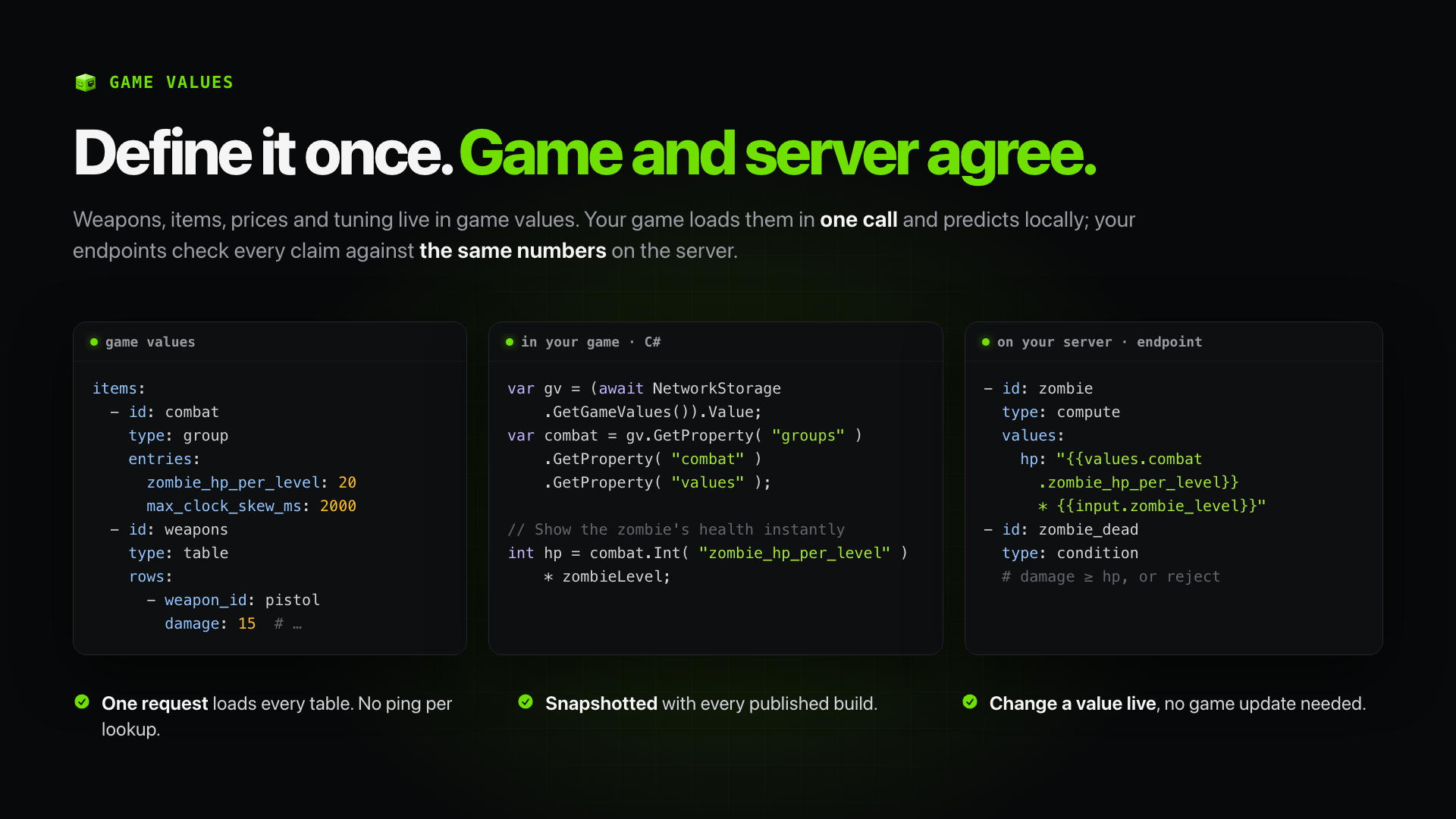
var gv = (await NetworkStorage.GetGameValues()).Value;
var combat = gv.GetProperty( "groups" ).GetProperty( "combat" ).GetProperty( "values" );
int zombieHp = combat.Int( "zombie_hp_per_level" ) * zombieLevel;
var weapons = gv.GetProperty( "tables" ).GetProperty( "weapons" )
    .ReadList( "rows", r => (Id: r.Str( "weapon_id" ), Damage: r.Int( "damage" ), Model: r.Str( "model" )) );
GetGameValues() loads every group and table in one request
(GET {ApiRoot}/values/{projectId}, /api by default). The library is API-only and keeps no offline
copy: load once when the game starts, then lookups in your code are local. The
game still calls the server for that load, and game code cannot write game values.
Endpoints on the server read the same numbers with
{{values.combat.zombie_hp_per_level}} and lookup steps with source: values.
The game values guide
covers authoring, revisions and a worked combat example that checks each claim on the server.
Owner console
The owner console runs on your own Network Storage server. It has guided editors with raw YAML, dry-run endpoint tests, the Game values page, version history and live server monitoring. The read-only demo shows the same screens with sample data.
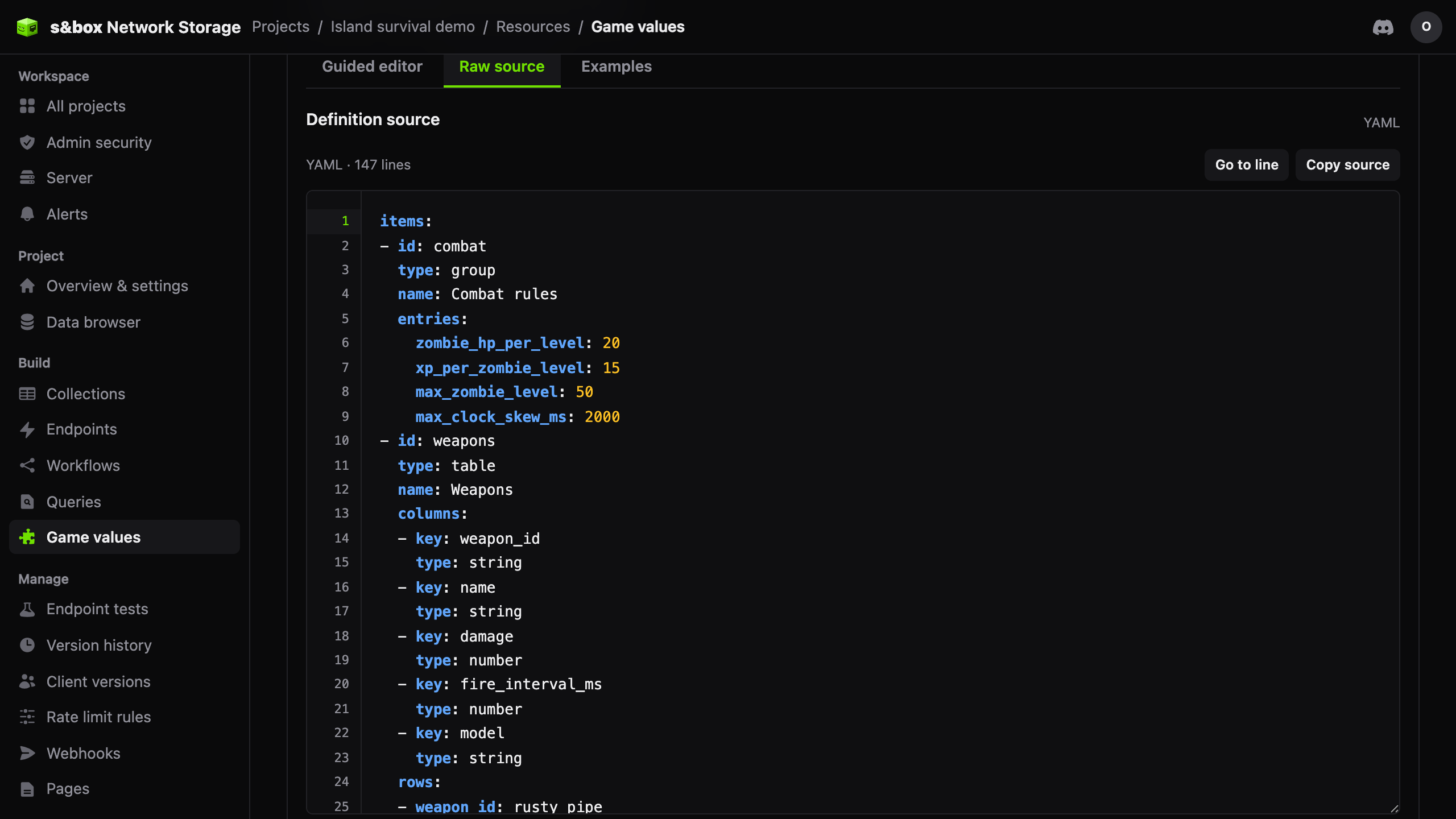 Game values |
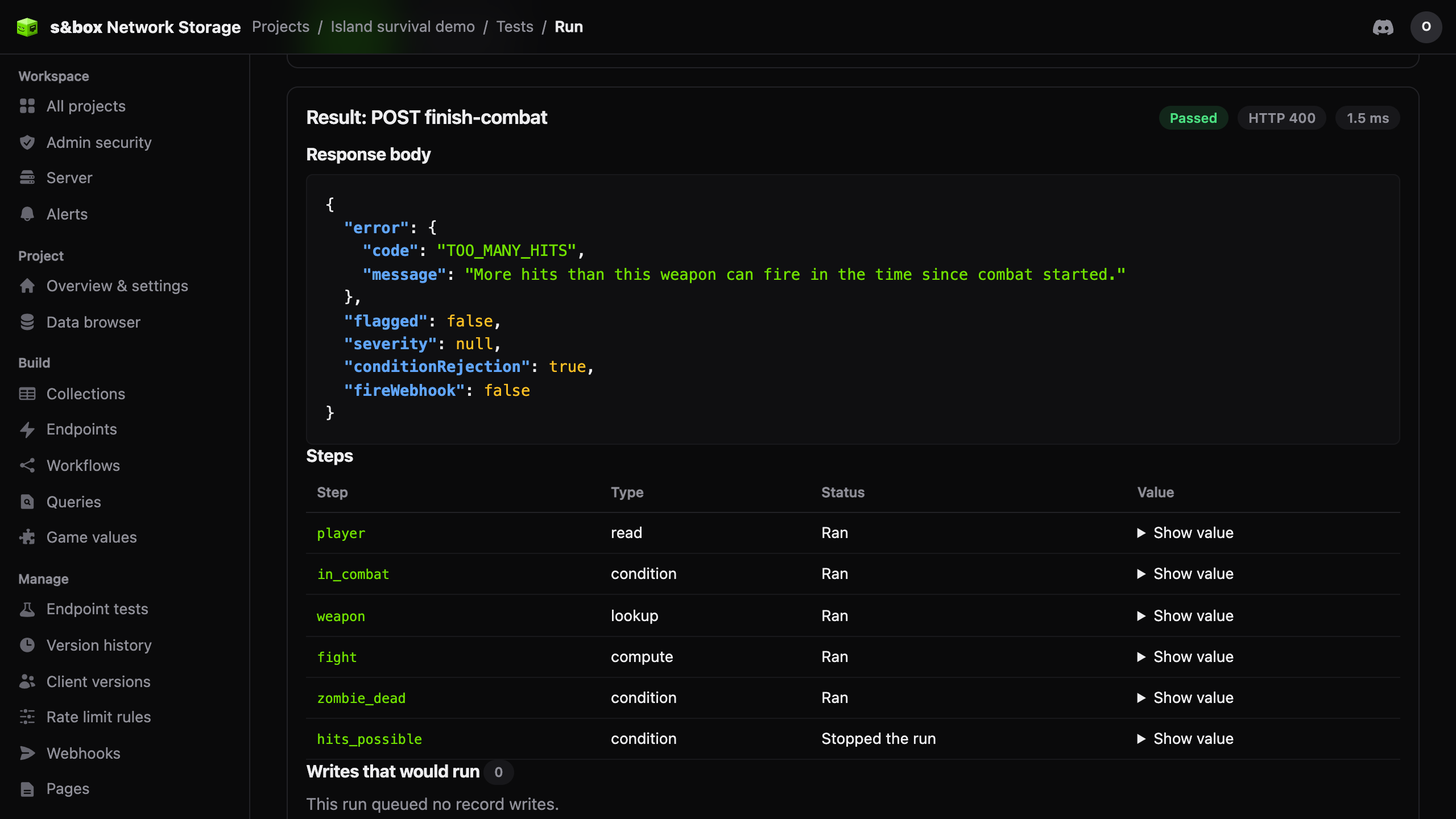 Endpoint test (dry run) |
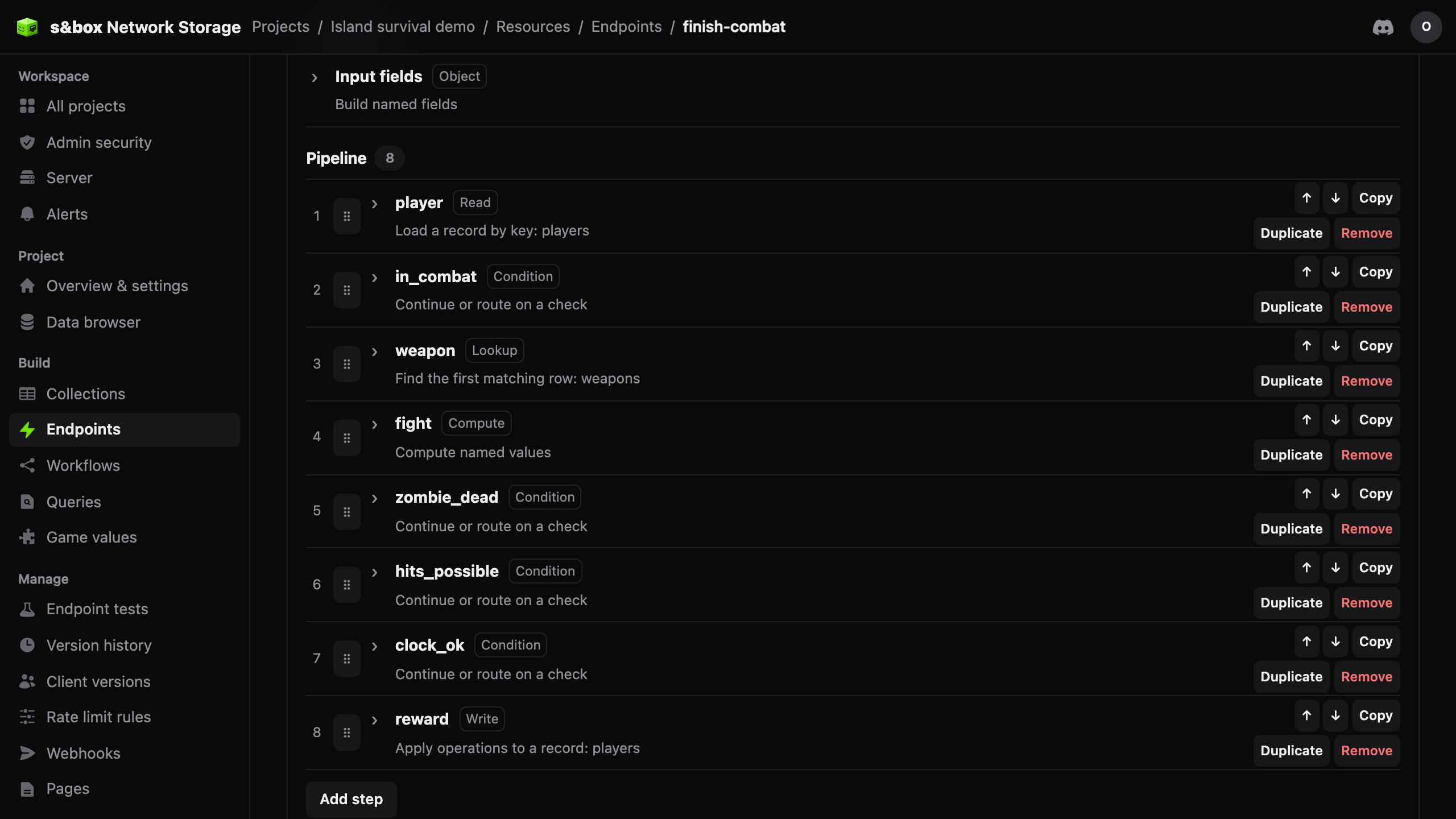 Endpoint pipeline |
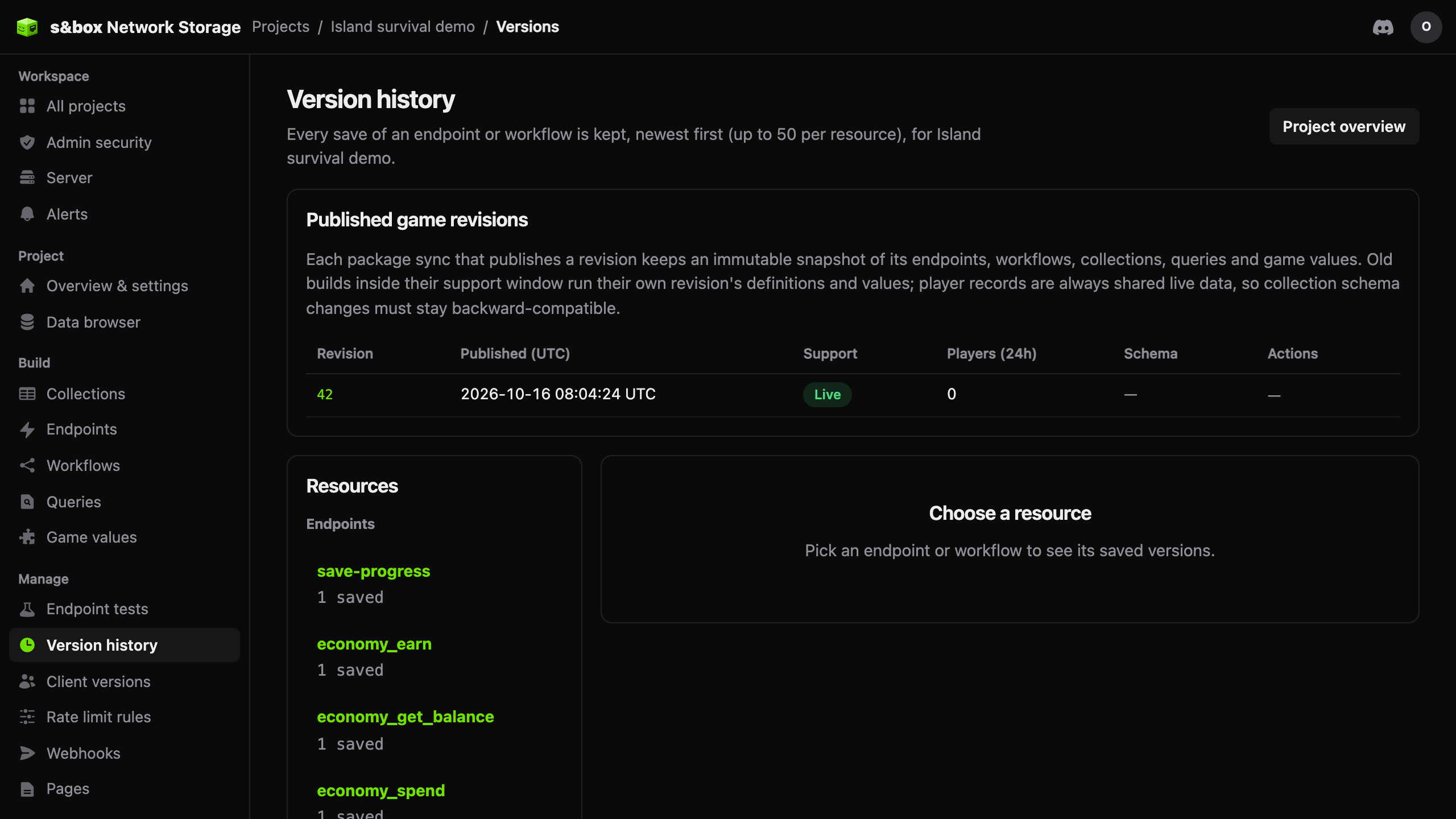 Version history |
Runtime API Reference
NetworkStorage (static)
| Method | Description |
|---|---|
Configure(projectId, apiKey) |
Set credentials. Call once at startup. |
CallEndpoint(slugOrUrl, input?) |
Call a server endpoint by slug or endpoint URL. Returns JsonElement?. |
GetGameValues() |
Fetch all game values (constants + tables). Returns JsonElement?. |
GetDocument(collectionId, documentId?) |
Read a document from a collection. Defaults to current player's Steam ID. |
SaveDocument(collectionId, documentId, data) |
Save/replace a collection document. Dedicated servers attach the configured secret key automatically. |
UpdateDocument(collectionId, documentId, ops) |
Apply server-side operations (set, inc, push, pull, remove) to a document. |
DeleteDocument(collectionId, documentId?) |
Delete one collection document/row. Public calls require record deletes to be enabled; dedicated secret keys with collection execute permission can delete rows for diagnostics/backoffice cleanup. Does not delete collection schemas. |
ListRecords/CreateRecord/RenameRecord/DeleteRecord |
Manage multi-record save slots. |
NetworkStorageAnalytics.TrackEvent(eventType, payload?) |
Report an allowlisted custom Player Analytics event. |
NetworkStorageAnalytics.Warning(code, message?, context?) |
Report a recoverable warning/pain point to the player timeline. |
NetworkStorageAnalytics.Error(exception, code?, context?) |
Report an exception/error to the player timeline without breaking gameplay. |
NetworkStorageAnalytics.SessionStart/SessionEnd |
Report managed session boundaries when analytics is enabled. |
IsConfigured |
true after Configure() has been called. |
ApiRoot |
The full API URL (e.g. https://api.sboxcool.com/api, or .../v3 when configured). |
See analytics.md for Player Analytics setup, custom events, warnings, and error reporting examples.
JsonHelpers (static)
Safe extraction from API JsonElement payloads with caller-provided defaults. Handles missing keys and string-to-number coercion.
var name = JsonHelpers.GetString( data, "playerName", "Unknown" );
var level = JsonHelpers.GetInt( data, "level", 1 );
var speed = JsonHelpers.GetFloat( data, "speed", 1.0f );
var active = JsonHelpers.GetBool( data, "active", true );Extension Methods (on JsonElement)
Shorthand wrappers around JsonHelpers, plus collection parsers:
// Shorthand
var name = data.Str( "playerName", "Unknown" );
var level = data.Int( "level", 1 );
var speed = data.Float( "speed", 1.0f );

// Parse arrays
var upgrades = data.ReadStringList( "purchasedUpgrades" );

// Parse objects
var ores = data.ReadDictionary( "ores", v => (float)v.GetDouble() );

// Parse table rows
var items = data.ReadList( "rows", row => new ItemInfo(
    row.Str( "id" ), row.Str( "name" ), row.Int( "tier" )
) );SaveStateTracker
Wraps endpoint calls with automatic state management for HUD feedback:
var tracker = new SaveStateTracker();

// Simple tracked call
var result = await tracker.Call( "mine-ore", new { ore_id = "iron", kg = 5 } );
// tracker.State is now Saved or Error
// tracker.IsBusy is true while any call is in flight

// Optimistic update with auto-revert
await tracker.CallAndApply( "sell-ore", input,
    applyOptimistic: () => { /* update local state */ },
    applyServer: (data) => { /* apply authoritative response */ },
    revert: () => { /* undo on failure */ }
);NetLog
Static ring buffer capturing all Network Storage events. Use it for debug panels:
// Entries are added automatically by NetworkStorage
foreach ( var entry in NetLog.Entries )
{
    // entry.Time, entry.Kind (Request/Response/Error/Info),
    // entry.Tag, entry.Message
}

// Add custom entries
NetLog.Info( "my-system", "Custom log message" );

// Track changes (for UI refresh)
var version = NetLog.Version; // increments on every add/clearEditor Sync Tool
The Sync Tool lets you manage your sboxcool.com project data as local YAML source files, then push/pull changes through the API. YAML is the preferred authoring format. Existing legacy JSON resources remain readable and pushable for compatibility; newly created and pulled resources are written as YAML.
Open the Sync Tool
Editor > Network Storage > Sync Tool
Workflow
- Define new collections, endpoints, workflows, tests, and libraries as YAML source files in
Editor/Network Storage/ - Existing JSON resources can still be pushed; migrate them to YAML when convenient to use the current authoring format
- Click Check for Updates to compare local files against the remote server
- Push sends your local changes to sboxcool.com
- Pull downloads the latest from sboxcool.com to your local files
- View Diff shows a side-by-side comparison before overwriting
Source Authoring
YAML source files use kind-specific names:
collections/<id>.collection.yml
endpoints/<slug>.endpoint.yml
workflows/<id>.workflow.yml
tests/<id>.test.yml
libraries/<id>.library.yml
.yaml is also accepted, but project documentation and generated examples should prefer .yml. Legacy JSON files are unsupported and are not automatically reverse-converted into YAML.
Each source file starts with:
sourceVersion: 1
kind: endpoint
id: mine-ore
definition:
  method: POST
  steps: []
See source-authoring.md, source-authoring.schema.json, and Examples/SourceAuthoring/ for the current source model and examples.
Validate and preview source files locally:
python Libraries/sboxcool.network-storage/Editor/source_compiler.py --project-root .
python Libraries/sboxcool.network-storage/Editor/sync.py --project-root . --sources --dry-runStatus Indicators
| Icon | Meaning |
|---|---|
| ✓ | In sync — local matches remote |
| ▲ | Local only — exists locally but not on server |
| ▼ | Remote only — exists on server but not locally |
| ● | Differs — local and remote have different content |
Data Folder Structure
Editor/
  Network Storage/              # Configurable in Setup
    .env                        # Credentials (gitignored, never published)
    collections/                # YAML source collections
      player_data.collection.yml
      game_values.collection.yml
    endpoints/                  # YAML source endpoints
      load-player.endpoint.yml
      mine-ore.endpoint.yml
      sell-ore.endpoint.yml
    workflows/
      check-currency.workflow.yml
    libraries/
economy.library.ymlSecurity
- Secret key (
sbox_sk_) is stored inEditor/Network Storage/.env— theEditor/directory is excluded from s&box publishing, so your secret key never ships with your game - Public key (
sbox_ns_) is safe to include in your game code — it can only be used with Steam authentication - The
.envfile is gitignored by default — never commit it to version control - See
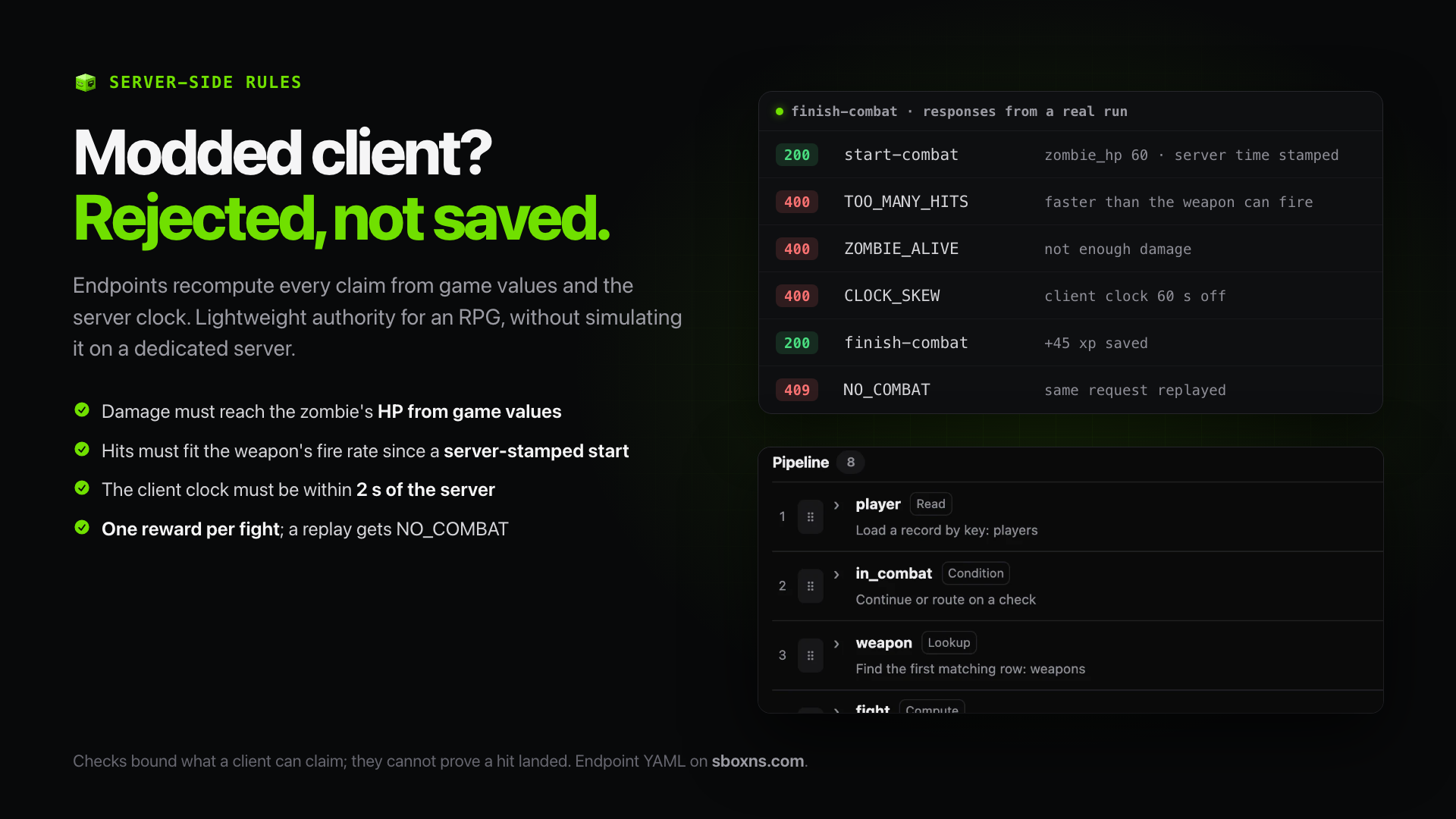
.env.examplefor the expected format - Anti-exploit checks run on the server. Endpoints recompute each claim from game values and the server clock, and reject impossible results. The checks bound what a client can claim; they cannot prove that a hit landed.
- Clients reach collections through endpoints. New collections start in
accessMode: endpoint. Direct document calls from game clients get403 ENDPOINT_ONLY.
Data Source Mode
Network Storage runs in API Only mode. Runtime reads and editor sync operations use the API; local JSON files and API fallback modes are unsupported.
MCP Server (for AI Agents)
This repo includes an MCP (Model Context Protocol) server that gives AI coding agents like Claude deep knowledge of the Network Storage system — collections, endpoints, workflows, template syntax, error diagnosis, and more.
What It Provides
- 10 tools — validate source files, scaffold new collections/endpoints/workflows, get documentation, diagnose errors
- 8 resources — all documentation files exposed for contextual reading
Setup
The MCP server requires Bun to be installed.
- The
.mcp.jsonfile at the repo root auto-configures Claude Code to use the MCP server - Dependencies are installed automatically on first launch (
bun install) - Open Claude Code in this repo and the MCP will be available
To verify it's working, run /mcp in Claude Code — you should see sbox-network-storage listed.
Manual Setup (other MCP clients)
If your MCP client doesn't auto-discover .mcp.json, add this to your MCP configuration:
{
  "mcpServers": {
    "sbox-network-storage": {
      "command": "bash",
      "args": ["-c", "cd mcp && bun install —silent && cd .. && bun run mcp/index.ts"]
    }
  }
}
Set the working directory to this repository root.
Available Tools
| Tool | Description |
|---|---|
get_documentation |
Retrieve docs by topic (collections, endpoints, workflows, setup, errors, etc.) |
validate_collection |
Validate a collection definition for correct schema and naming |
validate_endpoint |
Validate an endpoint definition — steps, operators, templates, constraints |
validate_workflow |
Validate a workflow definition — conditions, onFail config |
scaffold_collection |
Generate a collection YAML source template |
scaffold_endpoint |
Generate an endpoint YAML source template |
scaffold_workflow |
Generate a workflow YAML source template |
get_examples |
Get examples for common game scenarios (inventory, currency, leaderboard, etc.) |
validate_env_config |
Validate .env credential file format |
diagnose_error |
Diagnose s&box console errors and suggest fixes |
In-Engine Tools (sbox-cli network_storage toolset)
s&box's sbox-cli MCP bridge exposes these tools while the editor, or a game or dedicated server started with -mcp, is running. Start with ns_status (game code) or ns_editor_status (editor), then ns_sync_preflight before ns_sync_push.
| Tool | Where | Description |
|---|---|---|
ns_status |
Game code and editor | Library version, configuration state (no keys), and whether game code may reach the API |
ns_configure |
Game code and editor | Configure project ID, API key and base URL, or auto-configure when all are empty |
ns_call_endpoint |
Game code and editor | Call an endpoint; returns ok, body, errorCode, errorMessage |
ns_get_document |
Game code and editor | Read a document from a collection |
ns_game_values |
Game code and editor | Read game values |
ns_editor_status |
Editor only | Sync Tool config (no keys), local source counts, optional server check |
ns_sync_preflight |
Editor only | Dry-run the batch push; writes nothing |
ns_sync_push |
Editor only | Validate, preflight and push all sources; verify reads back and compares each resource |
ns_auto_test |
Editor only | Auto-generate and run tests for one endpoint, or for all endpoints |
ns_run_tests |
Editor only | Run the saved test suite on the server |
Endpoint and test failures come back as data, not tool errors. Tools that cannot run (for example, when the library is not configured) throw an error with a message saying what to fix.
Compatibility (LTS)
The library and server release independently and both are LTS. Certify each library/server/engine/provider pairing once with real evidence; a fundamental wire/semantic change invalidates affected certifications and must be re-tested before release. Public methods and endpoints are LTS surface: no silent rename, removal or narrowing. See docs/compatibility-certification.md.
License
MIT — see LICENSE.